
XCaptchaToken
Solve an xCaptcha widget and get the passcode the target form expects.
xCaptcha is a widget-based captcha. The challenge is a code-assembly puzzle: a distorted string is drawn across a noisy banner, and the visitor picks the two tiles below that, joined in order, spell it. Clearing it yields a passcode the form submits and the site verifies server-side.
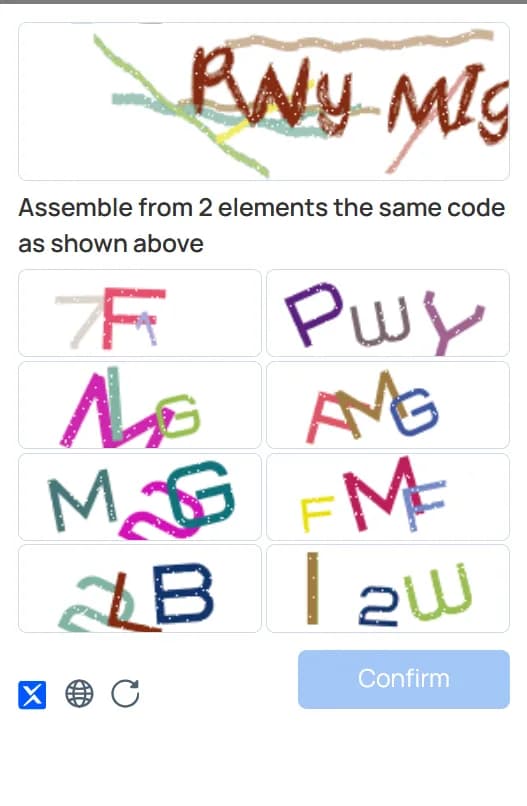
Supply the page URL and the site key, and you get that passcode back.
Recognizing the widget
The markup from xCaptcha's installation guide is distinctive:
<div id="__xCaptchaDiv" data-sitekey="SITE_KEY" style="min-height:75px!important"></div>
<script src="https://static.xcaptcha.com/js/api.js"></script>
The reliable tells are the __xCaptchaDiv container, the static.xcaptcha.com/js/api.js script, and the xcaptcha_response input the widget injects into the form.
An invisible integration hides the div with display:none and triggers the challenge from JavaScript via window.__xcaptcha.check(callback). Use this same task either way.
Finding the site key
The site key is public, so it is always in the page:
- Read the
data-sitekeyattribute on the#__xCaptchaDivcontainer. - If the widget is invisible, search the page source for
sitekey— the value is in the same attribute or in the script's init call. - As a fallback, watch the network tab while the widget loads; the key appears in the requests to
xcaptcha.com.
It is a 32-character hex string, for example 88cd53f6a243091cadbcd9245985a4a9. Do not send the private key — that one belongs to the site's server and is never needed here.
Send websiteURL as the full URL of the page rendering the widget, not the endpoint you post the form to.
Submitting the passcode
Send the returned token as the form's xcaptcha_response field — the default input name, though a custom integration may rename it, so confirm against a manual submission.
Passcodes are single-use and expire, so solve as part of the request that consumes the token rather than building a pool in advance. A stale or reused passcode usually surfaces as a generic "captcha failed" message on the form.
Supported Providers
| Provider | Price per 1,000 | Routing |
|---|---|---|
 | $1.00 |
Request Schema
| Field | Type | Required | Description |
|---|---|---|---|
clientKey* | string | Yes | Your API key. Create one in the AnySolver dashboard. Example: |
task* | object | Yes | The task body. Required fields depend on the task type. See Tasks for per-task schemas. View task properties |
settings | object | No | Per-request settings for routing, auto retry, auto fallback, and proxy behavior. See Routing Strategies. View settings reference |
Task Object Properties
The task field accepts an object with the following properties:
| Field | Type | Required | Description |
|---|---|---|---|
type* | Yes | ||
websiteURL* | URL | Yes | Full URL of the page where the CAPTCHA is displayed. Example: |
websiteKey* | string | Yes | The site key found in the CAPTCHA HTML element on the target page. Example: |
proxy* | string | object | Yes |
Optional fields are not guaranteed across providers
Response Schema
| Field | Type | Required | Description |
|---|---|---|---|
status* | Yes | Task status: "processing", "ready", or "failed". Example: | |
errorId* | Yes | 0 = success, 1 = external error, 2 = internal error. Example: | |
taskId | string | No | Unique identifier returned when the task was created. Example: |
errorCode | No | Machine-readable error code. Example: | |
errorDescription | string | No | Human-readable error message with resolution hints. Example: |
cost | number | No | Actual cost charged for this task in USD. Example: |
taskType | No | The type of CAPTCHA task to solve. Example: | |
provider | No | Provider that handled this task. While processing, the provider currently solving it. Example: | |
solution | object | No |
Solution Object Properties
The solution field contains an object with the following properties:
| Field | Type | Required | Description |
|---|---|---|---|
token* | string | Yes | The solved CAPTCHA token to submit with your form. Example: |
raw* | Record<string, unknown> | Yes | Raw provider response data for advanced use cases. |