
Routing Strategies
How AnySolver picks a provider for each task and how to configure it per API key.
AnySolver picks a provider per task based on the routing mode set on your API key. Set it once in the dashboard, override it per request when needed.
One balance, every provider
Routing across providers does not need separate accounts. Your AnySolver balance covers them all.
Strategies
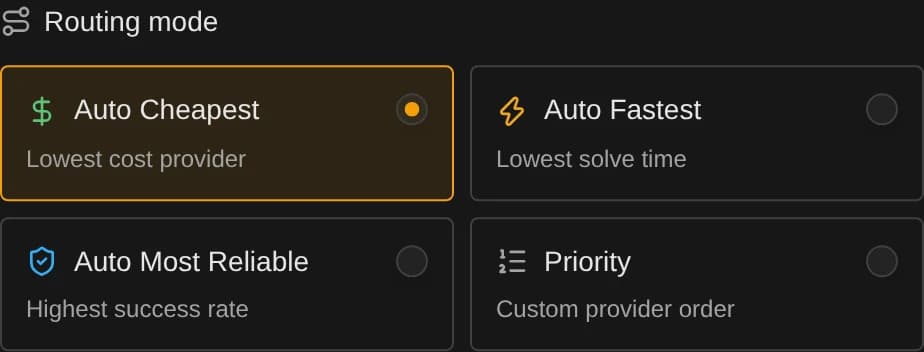
Auto Cheapest
Picks the provider with the lowest published price for the requested task type.
- Source: static pricing metadata. No database lookup, no warm-up needed.
- Best for: high-volume, cost-sensitive workloads.
- Tie-break: deterministic order when prices match.
Auto Fastest
Picks the provider with the lowest P90 solve time (90th percentile: 9 in 10 solves finish at or below it) based on recent performance.
- Source: aggregated stats, refreshed hourly.
- Sample windows: 12 hours, then 48 hours, then 30 days. Each provider is scored on its freshest window that has enough data, so a quiet provider still ranks on older data.
- Minimum data: 10 recent solve attempts in the window.
- Fallback: if no provider clears the minimum, falls back to Auto Cheapest.
Auto Most Reliable
Picks the provider with the highest success rate based on recent performance, adjusted for how much data backs it up.
- Source: aggregated stats, refreshed hourly.
- Sample windows: 48 hours, then 30 days. Each provider is scored on its freshest window that has enough data.
- Minimum data: 10 recent attempts in the window.
- Confidence-weighted: ranked by the lower bound of the success rate, so a provider needs a consistent track record, not a lucky 10/10, to win.
- Per-user fairness: the rate is combined across users with each user weighted by the square root of their volume, so one account with a broken setup (bad proxy, malformed requests) can't tank a provider's score just by sending far more tasks than everyone else.
- Fallback: if no provider clears the minimum, falls back to Auto Cheapest.
Priority
Uses an ordered provider list. The first provider in the list that supports the task type gets it.
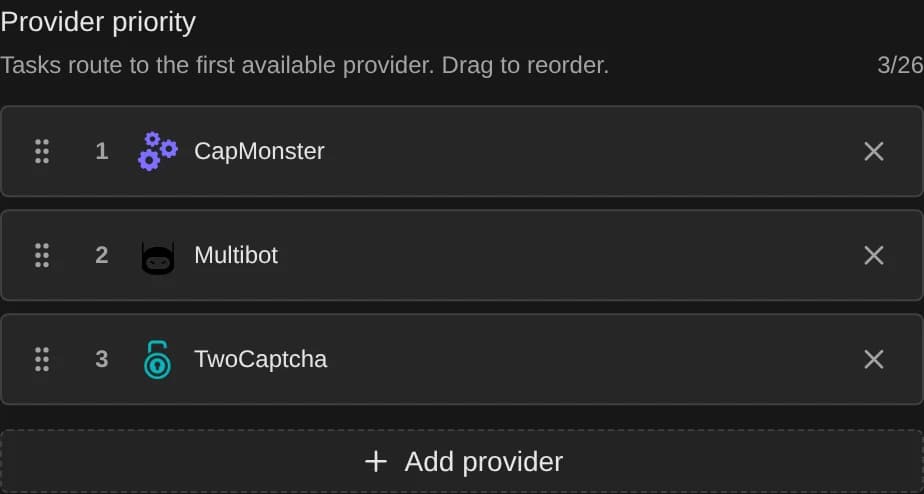
The order comes from one of two places, in this order:
settings.routing.providerOrderon the request.- The priority order saved on the API key.
{
    "settings": {
        "routing": {
            "mode": "priority",
            "providerOrder": ["CapSolver", "Multibot", "TwoCaptcha"]
        }
    }
}- Cap: up to 18 providers.
- Order required: if neither the request nor the key has one, the request fails with
Priority routing requires a provider order. providerOrderispriorityonly. Sending it with anauto*mode fails withsettings.routing.providerOrder can only be used when settings.routing.mode is "priority".
Priority mode does not fall back on its own
Without auto fallback enabled, Priority only tries the first supporting provider. Enable
fallback to walk down providerOrder, or add a supporting provider for every task type you send.
Set the routing mode
The mode lives on the API key; any request can override it.
Open Dashboard / API Keys and click Edit on a key.
Pick a routing mode. The same picker appears when you create a key.
For Priority, drag providers into your preferred order. Use + Add provider to extend the list (up to 18).
Click Save changes. New tasks on that key follow the new mode immediately.
To override per request, send settings.routing.mode on createTask:
{
    "settings": {
        "routing": { "mode": "autoCheapest" }
    }
}
Useful when one workload needs a different optimization. For example a bulk job that should run cheap while interactive traffic stays on Auto Most Reliable.
Excluded providers
settings.routing.excludedProviders removes providers from routing entirely. They are never used for the first attempt, retries, or fallbacks.
{
    "settings": {
        "routing": {
            "mode": "autoCheapest",
            "excludedProviders": ["CapSolver"]
        }
    }
}- A provider cannot be in both
providerOrderandexcludedProviders:Provider "CapSolver" cannot be in both settings.routing.providerOrder and settings.routing.excludedProviders. - Excluding every provider that supports the task type fails:
settings.routing.excludedProviders excludes every provider that supports this task type.
Auto retry & fallback
Enable recovery per request with settings.retry and settings.fallback, or key-wide in the dashboard:
- Auto retry re-tries the same provider.
- Auto fallback moves to the next provider in the routing candidate list.
{
    "settings": {
        "routing": { "mode": "autoCheapest" },
        "retry": { "enabled": true, "maxRetries": 2 },
        "fallback": { "enabled": true, "maxFallbacks": 2 }
    }
}
All fields are documented on createTask.
Fallback follows the routing mode
Fallback has no strategy of its own. It walks the candidate list produced by settings.routing.mode:
| Mode | Fallback order |
|---|---|
autoCheapest | Next-cheapest provider, then the next, … |
autoFastest | Next-fastest by P90 solve time. |
autoMostReliable | Next-highest success rate. |
priority | Next provider in providerOrder (or the key's order). |
maxFallbacks is clamped to the number of remaining candidates: once the list is exhausted, the task fails with the last error.
The 30-attempt budget
A task never runs more than 30 attempts in total, regardless of the retry and fallback budgets, so no configuration can keep a task processing indefinitely. Each provider can consume up to maxRetries + 1 of those attempts before the chain moves on. That means a high retry budget can starve the providers at the end of the fallback order: with maxRetries: 10 (11 attempts per provider), a fourth provider would only start at attempt 34, so it can never run.
Keep (maxRetries + 1) × maxFallbacks under 30 to give every provider a chance. The dashboard warns and suggests fixes when a key's configuration cannot reach all of its providers.
What triggers a retry or fallback
When you omit onErrors, AnySolver uses a safe default set of faults that another attempt can clear. See retryable vs. fallbackable errors for the exact codes and why fallback's set is wider.
Per-provider retry rules override only the fields they define and inherit the rest:
{
    "retry": {
        "enabled": true,
        "maxRetries": 1,
        "onErrors": ["TASK_TIMEOUT", "SERVICE_UNAVAILABLE"],
        "providerRules": { "CapSolver": { "maxRetries": 3 } }
    }
}
Forced provider disables fallback
A forced settings.routing.provider cannot be combined with auto fallback or with an auto* mode. There is no
second provider to fall back to. Use a priority order or an auto* mode instead.
Proxy tasks rotate proxies per attempt
When retry or fallback runs on a proxy task, each attempt consumes the next proxy in task.proxy unless you set
allowProxyReuse: true. See Proxy rotation across attempts.
Attempts reuse the original task payload
Every retry and fallback attempt re-sends the task exactly as you submitted it; only the proxy rotates. Parameters that are only valid once (one-time tokens, short-lived session or challenge values) cannot be refreshed mid-run, so later attempts would fail with stale values. For such tasks, disable retry and fallback and re-create the task with fresh values yourself.
See every attempt
Enable settings.statistics and getTaskResult returns a retry object listing each attempt with its provider, error, and duration, even while the task is still processing. Full field reference and example responses are on that page.
Key Pool Mode
keyPoolMode controls which provider keys your tasks can draw from.
| Mode | Description |
|---|---|
all (default) | Every available key, including community-contributed keys from Provider Exchange. |
platformOnly | Platform-managed keys only. Use for privacy-sensitive workloads. |
Default to `all`
all gives you a larger pool, fewer rate limits, and faster solves. Switch to platformOnly only when every task
must go through platform-owned keys.
Set the default per API key in the dashboard, or override per request with settings.routing.keyPoolMode on createTask. See the Privacy section on Provider Exchange for the full mechanics.
What routing ignores
Routing decisions look at the task type name and aggregated provider stats only. They do not look at:
- Website domain or URL.
- Sitekey characteristics.
- Per-website success history.
- Provider-specific flags like "most unflagged for site X".
Same task type, same routing
All tasks of the same type route identically, regardless of their parameters. If you need site-aware selection, use Priority and curate the order per API key.
Where the stats come from
Auto Fastest and Auto Most Reliable rely on the provider_stats aggregator:
- Runs hourly.
- Counts every attempt: when auto retry or fallback runs, each attempt is credited to the provider that actually ran it. A provider's failure is never hidden just because a later attempt on a different provider rescued the task: the signal that drives routing stays honest.
- Tracks P90 solve time and success/failure counts per provider per task type.
- Maintains 12 h / 48 h / 30 d windows.
- Ranks reliability by a confidence-adjusted success rate (Wilson lower bound), so a small lucky sample can't outrank a proven track record.
- Combines reliability per user, weighting each by the square root of their volume, so a single high-volume account can't dominate a provider's success rate.
Providers without enough recent traffic fall through to the cheapest option for that task type.