
ReCaptchaV3Token
Solve reCAPTCHA V3 score-based challenges and receive a verification token.
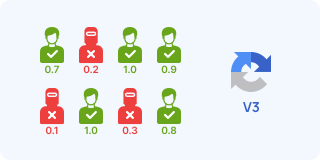
reCAPTCHA V3 runs entirely in the background. No checkbox, no image challenges. Instead of a challenge, it assigns a score from 0.0 (bot) to 1.0 (human). The website decides what to do based on the score (block, allow, or require additional verification).
Common score thresholds:
- 0.1–0.3: likely bot
- 0.5: uncertain
- 0.7–0.9: likely human
Successful completion returns a gRecaptchaResponse token like V2, but the site verifies it with a score check.

This variant uses your proxy. Use ReCaptchaV3TokenProxyLess if you don't need proxy control.
How the Score System Works
The minScore parameter sets the minimum score you need. A higher value means the provider must work harder to appear human.
Common values:
0.3: easy0.5: moderate0.7: standard (most common)0.9: hard (not all providers achieve this reliably)
If you're getting tokens that are rejected by the target site, try increasing the minScore value. Some sites
require 0.7 or higher.
Finding the Action Parameter
The pageAction is critical for V3. It tells Google what the user is doing. If the action does not match what the site expects, the token might be rejected.
How to find it:
- Open DevTools and go to the Sources or Network tab.
- Search (Ctrl + Shift + F) for
grecaptcha.executein the page JavaScript. - Look for:
grecaptcha.execute('sitekey', {action: 'THIS_VALUE'}).
Common values include login, submit, register, homepage, or verify.
Console script to find action:
Run this script in the browser console to extract the action from inline scripts:
(() => {
    const scripts = document.querySelectorAll('script:not([src])');
    const pattern = /grecaptcha\.execute\s*\(\s*['"][^'"]+['"]\s*,\s*\{\s*action\s*:\s*['"]([^'"]+)['"]/g;
    const actions = [];
    scripts.forEach((s) => {
        let m;
        while ((m = pattern.exec(s.textContent)) !== null) actions.push(m[1]);
    });
    if (actions.length) console.log('Actions found:', actions);
    else console.log('No actions found in inline scripts. Check external JS files.');
})();
Finding the Website Key
You can use the same methods as V2 to find the sitekey.
- Elements Tab: Search for
data-sitekey. - Network Tab: Filter for
recaptchaand look for thek=parameter in requests toanchor.
For V3, you should also check for:
grecaptcha.execute('THIS_KEY', ...)in JavaScript.- The render parameter in the script URL:
recaptcha/api.js?render=THIS_KEY.
Quick Console Script:
(() => {
    let key = null;
    // Check data-sitekey attributes
    document.querySelectorAll('[data-sitekey]').forEach((el) => {
        if (el.dataset.sitekey) key = el.dataset.sitekey;
    });
    // Check script render parameter
    if (!key) {
        document.querySelectorAll('script[src*="recaptcha"]').forEach((s) => {
            const url = new URL(s.src, location.href);
            const render = url.searchParams.get('render');
            if (render && render !== 'explicit') key = render;
        });
    }
    // Check iframe
    if (!key) {
        const iframe = document.querySelector('iframe[src*="recaptcha"]');
        if (iframe) key = new URL(iframe.src).searchParams.get('k');
    }
    console.log('sitekey:', key || 'Not found');
})();
Submitting the Token
Submit the token to your form or callback, just like in V2. Note that V3 tokens typically have shorter validity windows than V2 tokens.
The isSession parameter is not supported by all providers. Test with your target site to verify compatibility.
Supported Providers
| Provider | Price per 1,000 | Routing |
|---|---|---|
 | $1.00 | |
 | $1.45 - $2.99 | |
 | $0.52 | |
 | $1.00 | |
 | $1.50 | |
 | $0.80 | |
 | $1.50 |
Request Schema
| Field | Type | Required | Description |
|---|---|---|---|
clientKey* | string | Yes | Your API key. Create one in the AnySolver dashboard. Example: |
task* | object | Yes | The task body. Required fields depend on the task type. See Tasks for per-task schemas. View task properties |
settings | object | No | Per-request settings for routing, auto retry, auto fallback, and proxy behavior. See Routing Strategies. View settings reference |
Task Object Properties
The task field accepts an object with the following properties:
| Field | Type | Required | Description |
|---|---|---|---|
type* | Yes | ||
websiteURL* | URL | Yes | Full URL of the page where the CAPTCHA is displayed. Example: |
websiteKey* | string | Yes | The site key found in the CAPTCHA HTML element on the target page. Example: |
pageTitle* | string | Yes | Title of the target page (document.title). Some providers use it as an additional hint when solving reCAPTCHA V3 tasks. Example: |
proxy* | string | object | Yes | |
pageAction | string | No | Action passed to grecaptcha.execute(siteKey, { action: "..." }), such as verify, submit, or login. For V3 this should match the action used by the page exactly. Example: |
minScore | number | No | Requested reCAPTCHA V3 score from 0.1 to 0.9. Provider docs commonly show 0.3 to 0.5 as realistic values; higher scores are harder to obtain reliably. Example: |
apiDomain | string | No | Domain used to load reCAPTCHA. Use google.com for standard widgets or recaptcha.net when the page loads the API from recaptcha.net or www.recaptcha.net. Example: |
isSession | boolean | No | Enable session mode to receive worker session cookies together with the token. Only supported by providers that expose session-cookie responses. Example: |
Optional fields are not guaranteed across providers
Response Schema
| Field | Type | Required | Description |
|---|---|---|---|
status* | Yes | Task status: "processing", "ready", or "failed". Example: | |
errorId* | Yes | 0 = success, 1 = external error, 2 = internal error. Example: | |
taskId | string | No | Unique identifier returned when the task was created. Example: |
errorCode | No | Machine-readable error code. Example: | |
errorDescription | string | No | Human-readable error message with resolution hints. Example: |
cost | number | No | Actual cost charged for this task in USD. Example: |
taskType | No | The type of CAPTCHA task to solve. Example: | |
provider | No | Provider that handled this task. While processing, the provider currently solving it. Example: | |
solution | object | No |
Solution Object Properties
The solution field contains an object with the following properties:
| Field | Type | Required | Description |
|---|---|---|---|
token* | string | Yes | The solved CAPTCHA token to submit with your form. Example: |
raw* | Record<string, unknown> | Yes | Raw provider response data for advanced use cases. |
userAgent | string | No | User-Agent string used during solving (if applicable). |
cookies | Record<string, unknown> | No | Session cookies obtained during solving (if applicable). |