
PopularCaptchaToken
Solve PopularCaptcha challenges with your own proxy and get the response token.
PopularCaptchaToken returns a response token for standard PopularCaptcha challenges. This variant requires you to provide your own proxy.
What is PopularCaptcha?
PopularCaptcha is a widely-used CAPTCHA service that protects websites from automated bots. You'll encounter it on many popular platforms where you need to verify you're human.
Finding the Sitekey
To solve a PopularCaptcha challenge, you need the websiteKey (also called sitekey). Here's how to find it:
Step 1: Open Developer Tools
Right-click on the page and select "Inspect" or "Inspect Element" to open your browser's developer tools.
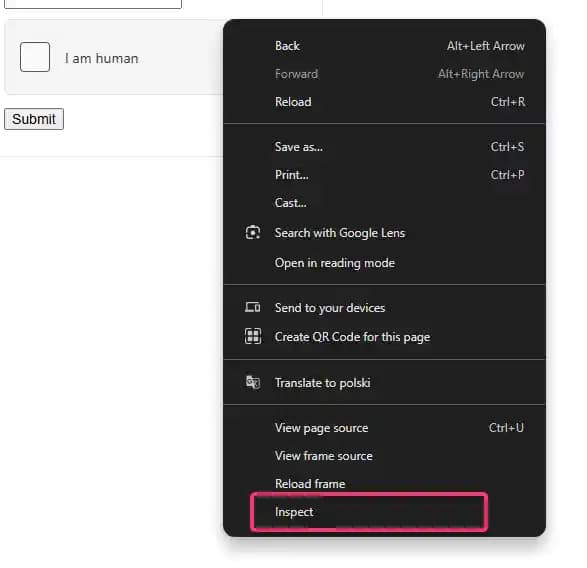
Step 2: Locate the Sitekey
Search for sitekey in the HTML. The sitekey is typically a UUID format like 10000000-ffff-ffff-ffff-000000000001.

Where to look
The sitekey is usually found in: - An iframe's src attribute - A data-sitekey attribute on a div - JavaScript
variables in the page source
Task Variants
| Task Type | When to Use |
|---|---|
PopularCaptchaToken | Standard visible challenges with your own proxy |
PopularCaptchaTokenProxyLess | Standard visible challenges when the target does not compare solve IP and submit IP |
PopularCaptchaInvisibleToken | Standard invisible challenges with your own proxy |
PopularCaptchaInvisibleTokenProxyLess | Standard invisible challenges when the target does not compare solve IP and submit IP |
PopularCaptchaEnterpriseToken | Enterprise challenges with your own proxy |
PopularCaptchaEnterpriseTokenProxyLess | Enterprise challenges only when the target does not compare solve IP and submit IP |
PopularCaptchaEnterpriseInvisibleToken | Invisible enterprise challenges with your own proxy |
PopularCaptchaEnterpriseInvisibleTokenProxyLess | Invisible enterprise challenges only when the target does not compare solve IP and submit IP |
Need Enterprise?
For enterprise-level challenges (Cord, Epic Games, Riot Games, etc.), see the Enterprise PopularCaptcha Guide.
Steam (extended.gid)
Steam serves PopularCaptcha on steampowered.com / steamcommunity.com. To solve it you must pass a gid inside the extended object:
{
    "extended": {
        "gid": "3399517004423014935"
    }
}
How to get the gid:
- Call
https://store.steampowered.com/join/refreshcaptcha/. - Read the
gidstring from the response. - Pass it as
extended.gidin your task, together with a proxy so the solve IP matches the IP that submits the token.
Steam requires a gid
A PopularCaptchaToken task for a Steam URL is rejected unless extended.gid is supplied.
Provider support
extended is a passthrough object forwarded verbatim, and only EZ-Captcha reads it. Other providers ignore it.
When to Use Proxy vs ProxyLess
Use the proxy variant (PopularCaptchaToken) when:
- The target website validates the CAPTCHA was solved from the same IP address
- You're solving for login pages or high-security endpoints
- You need consistent IP matching
Use the proxyless variant (PopularCaptchaTokenProxyLess) when:
- The website doesn't enforce IP matching
- You want a simpler integration
- The provider's proxies are acceptable for your use case
See the Proxy Configuration guide for details on proxy formats and best practices.
Supported Providers
| Provider | Price per 1,000 | Routing |
|---|---|---|
 | $2.99 | |
 | $2.00 | |
 | $4.00 | |
 | $10.00 | |
 | $3.00 | |
 | $8.00 | |
 | $0.70 | |
 | $5.00 | |
 | $1.00 | |
 | $7.00 | |
 | $0.65 |
Request Schema
| Field | Type | Required | Description |
|---|---|---|---|
clientKey* | string | Yes | Your API key. Create one in the AnySolver dashboard. Example: |
task* | object | Yes | The task body. Required fields depend on the task type. See Tasks for per-task schemas. View task properties |
settings | object | No | Per-request settings for routing, auto retry, auto fallback, and proxy behavior. See Routing Strategies. View settings reference |
Task Object Properties
The task field accepts an object with the following properties:
| Field | Type | Required | Description |
|---|---|---|---|
type* | Yes | ||
websiteURL* | URL | Yes | Full URL of the page where the CAPTCHA is displayed. Example: |
websiteKey* | string | Yes | The site key found in the CAPTCHA HTML element on the target page. Example: |
proxy* | string | object | Yes | |
userAgent | string | No | Browser User-Agent string. Must match the browser used on the target page. Not all providers properly support this parameter. Verify the compatibility with the provider you are using. |
rqdata | string | No | Pass this value if captcha config returns captcha_rqdata/captcha_rqtoken (e.g. Cord channel join). Example: |
extended | Record<string, unknown> | No | Provider-specific passthrough object, forwarded to the provider as-is. Only supported by EZ-Captcha; ignored by every other provider. For Steam targets it must include a Example: |
Optional fields are not guaranteed across providers
Response Schema
| Field | Type | Required | Description |
|---|---|---|---|
status* | Yes | Task status: "processing", "ready", or "failed". Example: | |
errorId* | Yes | 0 = success, 1 = external error, 2 = internal error. Example: | |
taskId | string | No | Unique identifier returned when the task was created. Example: |
errorCode | No | Machine-readable error code. Example: | |
errorDescription | string | No | Human-readable error message with resolution hints. Example: |
cost | number | No | Actual cost charged for this task in USD. Example: |
taskType | No | The type of CAPTCHA task to solve. Example: | |
provider | No | Provider that handled this task. While processing, the provider currently solving it. Example: | |
solution | object | No |
Solution Object Properties
The solution field contains an object with the following properties:
| Field | Type | Required | Description |
|---|---|---|---|
token* | string | Yes | The solved CAPTCHA token to submit with your form. Example: |
raw* | Record<string, unknown> | Yes | Raw provider response data for advanced use cases. |
userAgent | string | No | User-Agent string used during solving (if applicable). |