
PopularCaptchaEnterpriseToken
Solve PopularCaptcha Enterprise challenges with your own proxy.
PopularCaptchaEnterpriseToken solves enterprise-level PopularCaptcha challenges with additional security features. This variant requires you to provide your own proxy.
What is PopularCaptcha Enterprise?
Enterprise PopularCaptcha is a more advanced version of the standard service with higher security measures. It's commonly used by platforms like Cord, Epic Games, Riot Games, and other services requiring stricter bot protection.
The key difference is that enterprise challenges often require an additional rqdata parameter that must be extracted from the target website's API response.
Cord Integration
Cord uses PopularCaptcha Enterprise for bot protection. When your request is blocked by a CAPTCHA, Cord responds with status 400 and includes the captcha details in the response.
Extracting Captcha Parameters
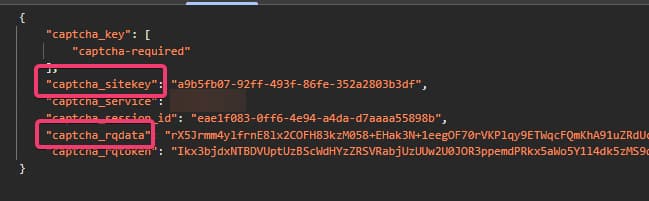
When you receive a 400 response from Cord's API, check the response body for captcha details:
{
    "captcha_key": ["captcha-required"],
    "captcha_sitekey": "a9b5fb07-92ff-493f-86fe-352a2803b3df",
    "captcha_service": "xxx",
    "captcha_session_id": "eae1f083-0ff6-4e94-a4da-d7aaaa55898b",
    "captcha_rqdata": "rX5Jrmm4ylfrnE8lx2COFH83kzM058+EHak3N+1eegOF70r...",
    "captcha_rqtoken": "Ikx3bjdxNTBDVUptUzBScWdHYzZRSVRabjUzUUw2U0JOR3ppemd..."
}
You need to extract:
captcha_sitekey: use aswebsiteKeyin your task.captcha_rqdata: use asrqdatain your task.
Task Variants
| Task Type | When to Use |
|---|---|
PopularCaptchaToken | Standard visible challenges with your own proxy |
PopularCaptchaTokenProxyLess | Standard visible challenges when the target does not compare solve IP and submit IP |
PopularCaptchaInvisibleToken | Standard invisible challenges with your own proxy |
PopularCaptchaInvisibleTokenProxyLess | Standard invisible challenges when the target does not compare solve IP and submit IP |
PopularCaptchaEnterpriseToken | Enterprise challenges with your own proxy |
PopularCaptchaEnterpriseTokenProxyLess | Enterprise challenges only when the target does not compare solve IP and submit IP |
PopularCaptchaEnterpriseInvisibleToken | Invisible enterprise challenges with your own proxy |
PopularCaptchaEnterpriseInvisibleTokenProxyLess | Invisible enterprise challenges only when the target does not compare solve IP and submit IP |
Proxyless is usually a fallback for enterprise
Most enterprise PopularCaptcha integrations compare the IP that solved the challenge with the IP that submits it. Start with the non-proxyless task unless you know the target accepts different IPs.
Steam (extended.gid)
Steam serves PopularCaptcha Enterprise on steampowered.com / steamcommunity.com. To solve it you must pass a gid inside the extended object:
{
    "extended": {
        "gid": "3399517004423014935"
    }
}
How to get the gid:
- Call
https://store.steampowered.com/join/refreshcaptcha/. - Read the
gidstring from the response. - Pass it as
extended.gidin your task, together with a proxy so the solve IP matches the IP that submits the token.
Steam requires a gid
A PopularCaptchaEnterpriseToken task for a Steam URL is rejected unless extended.gid is supplied.
Provider support
extended is a passthrough object forwarded verbatim, and only EZ-Captcha reads it. Other providers ignore it.
The rqdata Parameter
The rqdata parameter is a unique value generated by the target website for each CAPTCHA challenge. It's required for most enterprise implementations.
How to find it:
- Trigger a CAPTCHA challenge on the target site
- Check the API response (usually a 400 or 403 status)
- Extract the
captcha_rqdataorrqdatavalue from the JSON response - Include it in your task request
Need Standard PopularCaptcha?
For standard (non-enterprise) challenges, see the PopularCaptcha Guide.
Supported Providers
| Provider | Price per 1,000 | Routing |
|---|---|---|
 | $2.99 | |
 | $2.00 | |
 | $6.00 | |
 | $4.00 | |
 | $10.00 | |
 | $3.00 | |
 | $8.00 | |
 | $10.00 | |
 | $4.00 - $10.00 | |
 | $7.00 | |
 | $10.00 |
Request Schema
| Field | Type | Required | Description |
|---|---|---|---|
clientKey* | string | Yes | Your API key. Create one in the AnySolver dashboard. Example: |
task* | object | Yes | The task body. Required fields depend on the task type. See Tasks for per-task schemas. View task properties |
settings | object | No | Per-request settings for routing, auto retry, auto fallback, and proxy behavior. See Routing Strategies. View settings reference |
Task Object Properties
The task field accepts an object with the following properties:
| Field | Type | Required | Description |
|---|---|---|---|
type* | Yes | ||
websiteURL* | URL | Yes | Full URL of the page where the CAPTCHA is displayed. Example: |
websiteKey* | string | Yes | The site key found in the CAPTCHA HTML element on the target page. Example: |
proxy* | string | object | Yes | |
userAgent | string | No | Browser User-Agent string. Must match the browser used on the target page. Not all providers properly support this parameter. Verify the compatibility with the provider you are using. |
rqdata | string | No | Pass this value if captcha config returns captcha_rqdata/captcha_rqtoken (e.g. Cord channel join). Example: |
extended | Record<string, unknown> | No | Provider-specific passthrough object, forwarded to the provider as-is. Only supported by EZ-Captcha; ignored by every other provider. For Steam targets it must include a Example: |
Optional fields are not guaranteed across providers
Response Schema
| Field | Type | Required | Description |
|---|---|---|---|
status* | Yes | Task status: "processing", "ready", or "failed". Example: | |
errorId* | Yes | 0 = success, 1 = external error, 2 = internal error. Example: | |
taskId | string | No | Unique identifier returned when the task was created. Example: |
errorCode | No | Machine-readable error code. Example: | |
errorDescription | string | No | Human-readable error message with resolution hints. Example: |
cost | number | No | Actual cost charged for this task in USD. Example: |
taskType | No | The type of CAPTCHA task to solve. Example: | |
provider | No | Provider that handled this task. While processing, the provider currently solving it. Example: | |
solution | object | No |
Solution Object Properties
The solution field contains an object with the following properties:
| Field | Type | Required | Description |
|---|---|---|---|
token* | string | Yes | The solved CAPTCHA token to submit with your form. Example: |
raw* | Record<string, unknown> | Yes | Raw provider response data for advanced use cases. |
userAgent | string | No | User-Agent string used during solving (if applicable). |